

Documentation Index
Fetch the complete documentation index at: https://developer.prove.com/llms.txt
Use this file to discover all available pages before exploring further.
Scope
UI rules for the pre-filled consumer review screen when the flow uses Mobile Auth℠ in Pre-Fill for Consumers.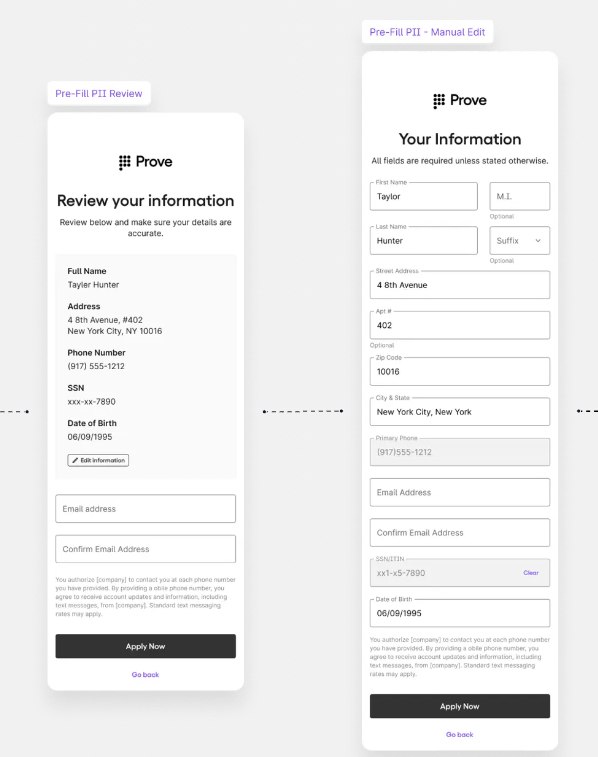
Display fields and requirements
Pre-Fill
Pre-Fill
| Required display field | Display requirements | Editable field |
|---|---|---|
| First Name | Yes — unmasked | Yes |
| Last Name | Yes — unmasked | Yes |
| Address | Yes — unmasked | Yes |
| Extended Address | Yes — unmasked | Yes |
| City | Yes — unmasked | Yes |
| State | Yes — unmasked | Yes |
| Postal Code | Yes — unmasked | Yes |
| Phone Number | Yes — unmasked | No |
| Social Security Number | Mask first five, display last four | Yes* |
| Date of Birth | Yes — MM/DD/YYYY | Yes** |
Pre-Fill with KYC
Pre-Fill with KYC
| Required display field | Display requirements | Editable field |
|---|---|---|
| First Name | Yes — unmasked | Yes |
| Last Name | Yes — unmasked | Yes |
| Address | Yes — unmasked | Yes |
| Extended Address | Yes — unmasked | Yes |
| City | Yes — unmasked | Yes |
| State | Yes — unmasked | Yes |
| Postal Code | Yes — unmasked | Yes |
| Phone Number | Yes — unmasked | No |
| Social Security Number | Mask first five, display last four | No — full SSN captured earlier in the flow |
| Date of Birth | Yes — MM/DD/YYYY | Yes* |
KYC confirmation copy (Pre-Fill with KYC)
| Placement | Copy | Optional UI |
|---|---|---|
| Immediately before the Submit control | ”I have reviewed the information provided and confirm it’s accurate.” | Confirmation checkbox |